
Built for TradingView
Click stop. Click entry. Size is done.
Stop losing ticks while you calculate lot size. ClickRisk Pro turns TradingView into an execution terminal. Click your stop, click your entry. Position size is calculated to the tick and submitted to your broker in milliseconds.
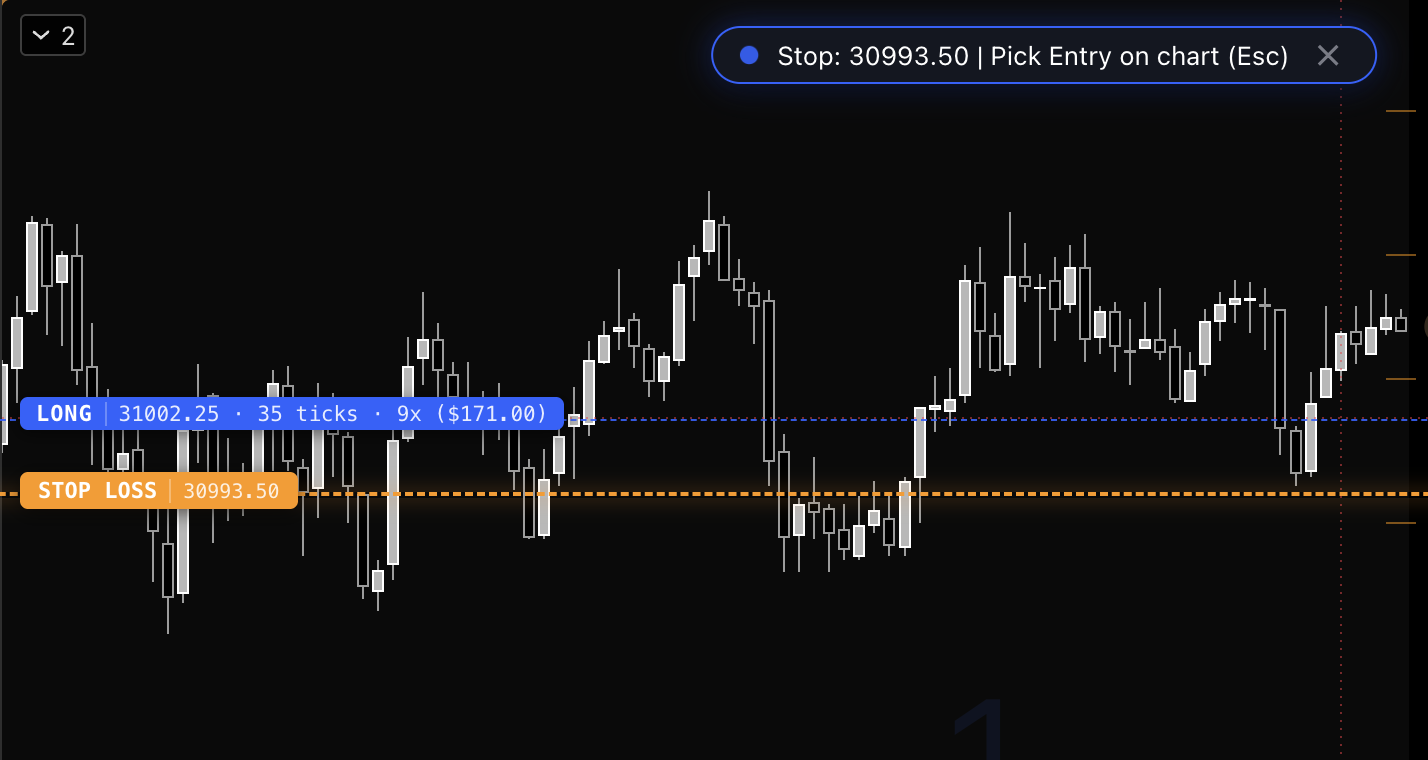
Click stop, click entry. Size hits the broker.
Why traders keep ClickRisk on the chart
- Define risk in exact USD or account percent. Contracts calculate automatically.
- Keep funded accounts inside drawdown, daily loss, and profit-lock rules.
- Move stops to breakeven without babysitting the chart.
- Execute with hotkeys and leave the chart clean.
How it works
Two clicks. Size is done.
- 01
Click your stop
Drop the stop on the chart. ClickRisk reads the distance in ticks.
- 02
Click your entry
Click the entry. Size is calculated from your dollar or percent risk in milliseconds.
- 03
Send the order
The position is submitted to your broker. Optional auto-breakeven takes it from there.
Trade Settings
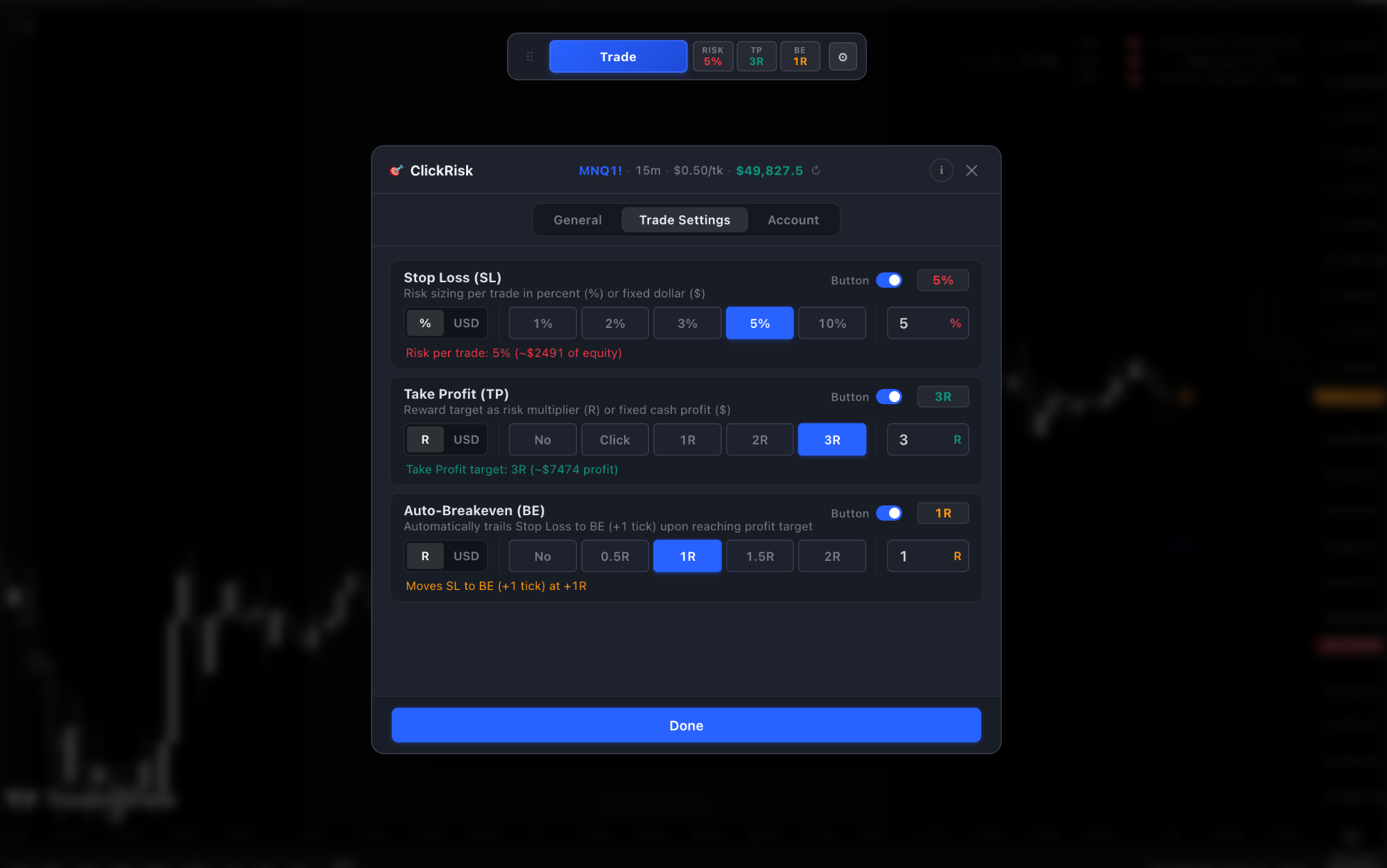
Set risk, targets, and breakeven once
Stop loss in percent or dollars. Take profit in R-multiples or cash. Auto-breakeven moves the stop the second price hits your level.
Inside Pro
Built for speed on a live chart
1-click chart sizing
Set risk in exact dollars or account percent. Contracts calculate automatically when you click stop and entry.
Prop Firm Shield
Drawdown caps, daily loss limits, and profit locks sit on every order so funded accounts stay inside the rules.
Auto-breakeven
The second price hits your target, ClickRisk moves the stop to breakeven.
Stealth Mode
Hotkey-driven execution (Cmd+S and trade keys) with zero extra clutter on the chart.
Live, paper, and replay
Same sizing on a live or funded account, TradingView paper, or chart replay. The math does not change with the mode.
Commissions in the size
Commission is included when size is calculated, so the dollar or percent you set is the risk you actually take.
Limited spots
Lifetime access for the first 100 traders
- Pay once. Access never expires, even as ClickRisk expands.
- All future Pro updates and TradingView engine patches.
- Direct support and priority feature requests.
Once the 100 spots fill, this plan closes. Monthly and yearly stay available.
Pricing
Start on a 3-day trial
Monthly includes a 3-day free trial of full ClickRisk Pro. Yearly saves 29%.
Monthly
Full Pro on TradingView. Cancel anytime.
$29/ month
3-day free trial
- 1-click chart sizing in USD or account %
- Prop Firm Shield (drawdown, daily loss, profit lock)
- Auto-breakeven
- Stealth hotkeys with zero chart clutter
- NQ, MNQ, ES, MES, YM, GC, CL, FDAX, crypto, forex
Yearly
Same Pro access, billed once a year.
$249/ year
29% off vs monthly
- Everything in Monthly
- Two months free vs paying monthly
- 29% off vs $29/month
- Billed once a year
- All future Pro updates
Lifetime
Limited spotsPay once. Access never expires.
$499one-time
First 100 traders
- Everything in Yearly
- One payment, never billed again
- All future Pro updates
- Direct support and priority requests
- Limited to the first 100 traders


Traders
What they say
No chart lag. That was my only concern. Works mint.
SOL moves too damn fast to be alt-tabbing into a lot calculator mid-breakout. I just click entry, click stop, done.
I blew my Apex funded accounts last month just by typing the wrong contract size during CPI. ClickRisk completely removes that human error.
0 drawdown violations since using this. Exact 3% risk from my prop drawdown limit every single click.
I am rather new to trading and always wondered how everybody executes so fast with proper size when they see their setups forming. Now I know.
Thanks for this tool. I will never trade without it again.
Literally saved my account from another fat-finger disaster on NQ. 10/10
I trade gold on the 1-minute. If you take longer than 3 seconds to calculate lot size, you missed the move. ClickRisk fixed my biggest execution leak.
Questions
After you start a trial or purchase, you get the ClickRisk Pro script and a short setup guide. Add it on TradingView, set risk in dollars or account percent, and size from the chart.
Yes. Prop Firm Shield is built for funded accounts: drawdown caps, daily loss limits, and profit locks, so size stays inside the firm’s rules. It covers futures, crypto, and forex.
The monthly plan starts with a 3-day free trial of full ClickRisk Pro. No need to pick yearly or lifetime until you know you want to keep it.
A $499 one-time payment, limited to the first 100 traders. Pay once, access never expires, including future Pro updates. Once the 100 spots fill, this plan closes. Monthly and yearly stay available.
NQ, MNQ, ES, MES, YM, GC, CL, FDAX, plus crypto and forex.
No. You click the stop, click the entry, and send. ClickRisk calculates size to the tick. You stay in control of every order.
Monthly can be canceled anytime after the trial. Yearly bills once a year. Lifetime is one payment.
Yes. After size is calculated, the position is submitted to your connected broker from TradingView. Optional auto-breakeven takes over from there.
Size the next trade from the chart
Hotkeys included. Chart stays clean.